

When it comes to SEO, and really all digital marketing, the most compelling stories have always, and will continue to come from data. And as a business owner or marketer, let’s face it–you can’t afford to make decisions based on anything else. One wrong test, created in the name of hunch, can mean the loss of thousands, or even millions of dollars. One right test, created in the name of a solid piece of data–well, that can be a complete game changer.
That’s what we’re here to talk about today. Let’s leave the theories at home and run through five easy, yet definitive SEO A/B tests that you can leverage now to drive more traffic to your website.
Contents
What is SEO A/B testing?
SEO A/B testing is the process of testing changes to pages (titles, meta, content, etc.) in isolation to measure impact on organic search traffic.
The purpose? To help you understand what’s working–and what’s not–when it comes to your SEO strategy.
Because Google’s algorithm is somewhat of a black box, and because Google changes its algorithm daily, SEO A/B testing can be somewhat of a hit-or-miss proposition. The results are also far from immediate. But within the right framework, and with the right tests and tracking, running SEO A/B tests can be a serious boon to your top-line traffic, conversions, and even revenue.
Let’s run through the tests.
5 SEO A/B tests you can run right now
Shared SEO knowledge is a great starting point, but these SEO tests take you beyond theory to learn what gets your unique website higher rankings and more traffic.
💡Want more SEO insights? Download How to Do SEO Right—Right Now!
1. Title tag variation
CTR (click-through rate) has a major influence on rankings. Small changes can lead to big wins. A recent study by Backlinko, analyzing over 4 million Google search results, found the following average CTRs for the top organic positions:
- Position 1: 27.6%
- Position 2: 15.8%
- Position 3: 11.0%
- Position 10: 2.4%
Now, I know what you’re thinking. That CTR dip is caused by the page being lower in the SERP (search engine results page), right?
To a certain extent, yes. Pages lower in the SERP are naturally going to have lower CTR because they’re lower on the page.
But that doesn’t mean that an unenticing title cannot have a really negative impact on CTR. And it does mean that having a great title can help push your page above your competitors and generate traffic by virtue of a higher ranking and a great title.
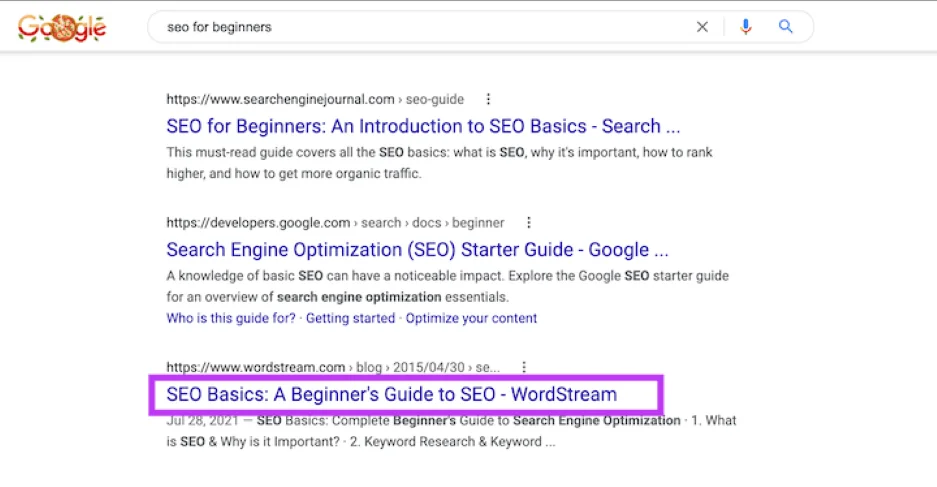
Title tags have a huge impact on CTR.
Here’s how to run a title tag a/b test.
Pick a page group (control + variant)
Select a set of semantically similar pages with enough traffic to test meaningfully. These could be product pages, blog posts, category pages, pillar pages—there’s really no wrong answer here.
Then, divide them into two statistically similar groups:
- Control Group: No change to the title tags.
- Variant Group: You’ll change the title tags here.
Create your title variations
Change only the title tags in the variant group. For example:
- Original: Buy Red Sneakers | BrandName
- Variant: Red Sneakers for Sale – Free Shipping | BrandName
One thing to keep in mind is that your new title should still target the primary keyword.
Measure performance
Generally speaking, you want to wait at least 2–4 weeks to collect enough data. SEO takes time. You want to give the experiment enough time to generate meaningful data.
For performance analysis, I like to use Google Search Console to track pre-click metrics like CTR, impressions, and clicks. GA4 is going to give you useful post-click metrics like traffic and conversion rate, but for pure rank and CTR improvement, which is really what we’re trying to track with this test, everything you need is in Search Console.
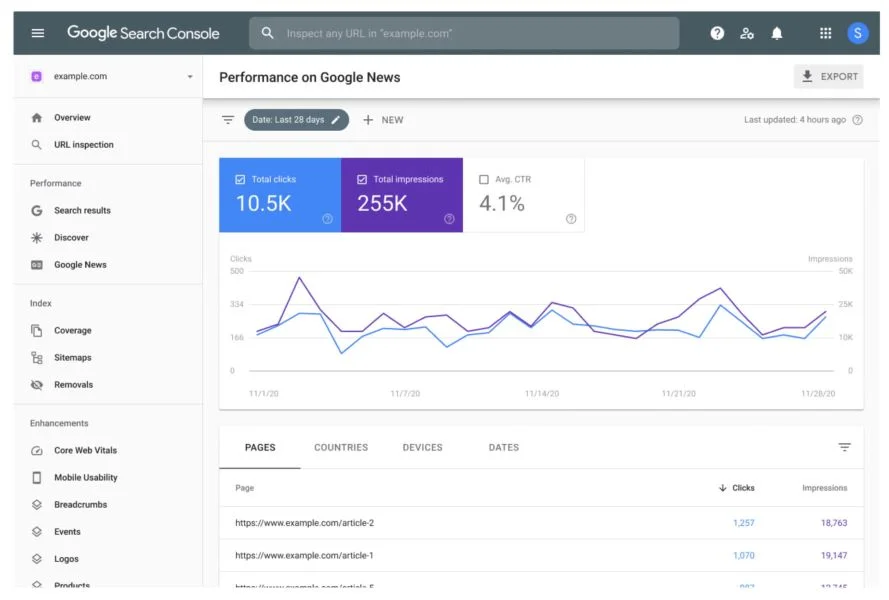
Iterate
Compare CTR and clicks between the control and variant groups. What did you learn? What sentiments or phrases worked? What didn’t? Is there anything else that could have affected the results, such as seasonality or rank changes?
Once you answer these questions, you can decide whether it’s worth rolling out new titles to other relevant pages.
Note: Google will often rewrite your title tag itself, which can create some data discrepancies when running this test–so keep that in mind.
2. AI Overview content optimization test
You’ve no doubt heard a lot about AI Overviews. This Google feature uses generative AI to summarize answers directly on the search engine results page (SERP). That means instead of just showing the typical list of blue links, Google now provides a synthesized answer at the top of the page for a ton of queries.

This can be a bit of a double-edged sword for online businesses. If you’re not optimized for Overviews, you risk losing organic visibility, even if you rank #1 traditionally. But if you are? You gain massive exposure at the top of the SERP, and, if you’re lucky, can capture clicks directly from the summary.
Here’s how to run the test.
Choose a page type and query set
Like the last test, you want to start with a group of pages that target similar search intent. Try to pick pages with somewhat stable organic traffic and rankings in the top 20.
Then, just like the last test, split the pages into a control group and a variable group. Try to have at least 20–30 URLs in each group for meaningful results.
Make structured content changes (variant only)
Then, in your variant group, you’re going to want to add the following elements:
- Quick answer box: Add a concise, direct summary at the top of the page (2–3 sentences under an H2 heading).
- FAQ section: Include natural question/answer pairs, ideally marked up with FAQ schema.
- Clean HTML structure: Use semantic tags like <h2>, <h3>, and <p> to help LLMs parse content easily.
- Factual, neutral tone: Write in a clear, unbiased tone that aligns with how Google’s AI summarizes content.
